Submission scripts generation
Bash script:
Generate submission files with the generate_submission_file.sh shim in
bin/:
generate_submission_file.sh help
Make ready the batch.header file:
#!/bin/bash

## SBATCH commands

#SBATCH ....

#module load ....
There are two generators, and they treat batch.header differently.
generate_submission_file.sh substitutes a placeholder: the header must
contain a line reading exactly submission here, which is replaced by the run
command. A header without that line produces run-*.sh scripts that set up
the job and then run nothing. None of the headers shipped in examples/
carries the line, so add it before using this script:
#!/bin/bash

#SBATCH --partition=dense --ntasks=1 --cpus-per-task=48 --time=1-0

#module load ....

submission here
mainprogram jobscript (below) appends instead: it copies the header and
writes the run command after its last line, so the header holds the scheduler
directives and the module loads and nothing else. That is what the shipped
headers are written for, and it is the generator to prefer.
Execute the following command to generate submission files for Quantum Espresso
electron-phonon coupling calculations using mpirun (parallel command) and 48
cores. Make sure to customize the batch.header file according to the desired
number of cores.
generate_submission_file.sh qe-elph mpirun 48
It generates bunch of submission scripts for electron-phonon coupling (EPC) with QE package.
Other available options are epw-elph, wannier_band, and vasp.
Worked example: examples/QE/tutorial1 and examples/VASP/tutorial1.
command line:
This requires adjusting appropriate keys and values in the
job_script dictionary in config.json: which_calc,
parallel_command, nproc and command_list.
mainprogram jobscript
One run-{command}.sh is written per entry of command_list, each being
batch.header with the command appended. With "command_combine": true
all of them go into a single run-{last_command}.sh in the order given.
No placeholder line is needed.
Preparing folder for calculations
Begin by creating a working directory:
mkdir work_dir
cd work_dir
Copy the
config.jsonfile from theutility/input_filesdirectory – see config.json – into it. That is the code’s input file. It does not have to be complete: whatever it does not mention comes from the packaged default, andmainprogram config-validatereports anything that is wrong.In addition to
config.jsonthere are several input files in the.informat. For VASP calculations, use the vasp.in file.Search for data, either in a database or in the
.cifor.vaspfiles in the working directory:mainprogram searchThis writes
input.inandmpid-list.in– except infromcifandfromvaspmode. Edit the first and second indices ininput.into select the range ofmpid-list.inyou want. Remember that the second index is exclusive.mainprogram searchneeds$MP_API_KEYto be set; see mpi_key.Generate the input files:
mainprogram downloadThis writes VASP (or QE) input files according to the
DFT = VASP(orDFT = QE) line in input.in, and creates mpid.in. Always set that line before going further.
For QE, it creates scf_dir directory and put scf-{id}.in files inside it. For VASP, it creates the R{id}-{name}/relax folder and put INCAR POSCAR POTCAR KPOINTS inside it. For example, for MgB2 where mpid = mp-763 and name = 'B2Mg1', folders named Rmp-763-B2Mg1/relax will be created to store the downloaded files for VASP, whereas scf-mp-763.in will be present inside scf_dir. See working folder.
In addition to generating input files, this process exclusively updates the INCAR file under the condition that a vasp.in file is provided, without generating it from scratch. This update only occurs if an INCAR file is already present within the R{id}-{name}/relax/ directory.
Note: Before executing mainprogram download, configure the POTCARs according to the instructions provided by pymatgen.
Input generation from structure files
There are 2 modes to generate input files from structure files.
cif Mode:
This mode is activated when 'mode':'fromcif' is set in the download section.
"download": {
  "mode": "fromcif",
  .......
  }
By default, it utilizes Pymatgen to explore CIF files.
If "use_cif2cell" is set to true, it employs the cif2cell package to convert .cif files to input files.
"inp": {
  "start": 1,
  "end": 65,
  "nkpt": 200,
  "evenkpt": false,
  "plot": "phband",
  "calc": "VASP",
  "use_cif2cell": true
}
VASP Mode:
In this mode, the code utilizes structure files in .vasp format to generate input files.
"mode": "fromvasp"is turn on.We employ the
.vaspformat instead ofPOSCARto prevent interference with other activities that specifically require aPOSCARfile format.
Now, execute the following commands to generate input files.
mainprogram search

mainprogram download
Inputs with magnetic ordering
For QE, one can generate input file with FM ordering by setting magnetic flag to true.
"pwscf_in": {
  "magnetic": true,
  "control": {},
  "systems": {},
  "electrons": {}}
Now, any command used to generate Quantum Espresso (QE) input files will create inputs with “FM” (ferromagnetic) ordering.
mainprogram download # aflow-download, oqmd-download, substitutiton, ....
For VASP, follow this, or use vasp.in to update INCAR file.
Combining data from different database
In this section, we explored techniques for extracting data and generating input files from three distinct databases, subsequently amalgamating them. To facilitate this process, we employed the following download keyword in the config.json input configuration. In this context, we will delve into the phase diagram of MgB2 using the convex hull method. To achieve this, we require the ground-state configurations of Mg, B, and Mg-B compounds, which we can extract from databases that offer extensive resources.
"download": {
  "mode": "chemsys",
  "element": {
    "metal": false,
    "FE": false,
    "thermo_stable": false,
    "exclude": ["Lu"],
    "ntype": [1, 2],
    "elm": ["B"],
    "prop": ["material_id", "formula_pretty", "structure", "formation_energy_per_atom", "band_gap", "energy_above_hull", "total_magnetization", "ordering", "total_magnetization_normalized_formula_units", "num_magnetic_sites", "theoretical", "nsites"],
    "ordering": ["NM", "Unknown"],
    "nsites": 10,
    "spacegroup": null
  },
  "inp": {
    "start": 1,
    "end": 65,
    "nkpt": 200,
    "evenkpt": false,
    "plot": "phband",
    "calc": "VASP",
    "use_cif2cell": false
  },
  "chemsys": {
    "entries": ["Mg", "B"],
    "size_constraint": 60,
    "ntype_constraint": 3,
    "must_include": ["Mg","B"],
    "FE": false,
    "thermo_stable": 0.08,
    "metal": false,
    "magnetic": true,
    "spacegroup": null
  },
  "oqmd": {
    "limit": 1000,
    "entries": ["Mg", "B"],
    "size_constraint": 60,
    "ntype_constraint": 3,
    "must_include": [],
    "metal": false,
    "magnetic": true,
    "spacegroup": null,
    "thermo_stable": true,
    "FE": true,
    "prop": ["composition", "spacegroup", "volume", "band_gap", "stability"]
    },
  "aflow": {
      "elm": ["Mg","B"],
      "nelm": 2,
      "nsites": 60,
      "metal": false,
      "FE": false,
      "spacegroup": null,
      "filter": false,
      "limit": 5000,
      "prop": [
          "spacegroup_relax", "Pearson_symbol_relax"
      ]
  }
},
Data from Materials Project:
Here, we use
chemsysmode.In
chemsysdictionary, we set necessary parameters.Here, we are preparing
VASPinput files.Now execute:
#To perform search.

mainprogram search

# This creates a list of compounds and stored in ``mpid-list.in`` file. Now edit ``input.in`` file to include all the compounds in ``mpid-list.in``. To download, execute:

mainprogram download

# Now VASP input files are stored within R{id}-{name} folder and the {id} and {name} are stored in ``mpid.in`` file.
Data from OQMD database:
Similarly, once adjusting parameters in oqmd dictionary, we execute following two commands:
mainprogram oqmd-search

# This creates a list of compounds and stored in ``mpid-list.in`` file. Again, edit start ``first line`` and `end `second line`` indices in input.in according to mpid-list.in. To download, execute:

mainprogram oqmd-download

# Likewise, {id} and {name} are appended to the mpid.in file, with inputs generated within the R{id}-{name} directory.
Data from AFLOW database:
Now, we adjust aflow dictionary as in example. Similarly, we execute following two commands:
mainprogram aflow-search

mainprogram aflow-download
This will create inputs for Mg-B binaries. Subsequently, we can utilize 'elm': ["Mg"] or 'elm': ["B"] with 'nelm': 1 to explore and download elemental solids.
Each process now generates input files within the R{id}-{name} directory and updates the mpid.in file accordingly. The mpid.in file after executing all of the above process looks like as:
v1 mp-110 Mg1
v2 mp-1056351 Mg1
v3 mp-1094122 Mg9
v4 mp-1247180 Mg10
v5 mp-1055956 Mg1
v6 mp-973364 Mg4
v7 mp-1056702 Mg1
v8 mp-153 Mg2
v9 mp-978275 Mg4B28
v10 mp-1016262 Mg7B1
v11 mp-1016250 Mg3B1
v12 mp-763 Mg1B2
v13 mp-1222002 Mg2B6
v14 mp-365 Mg4B16
v15 mp-1023515 Mg15B1
v16 mp-632401 B12
v17 mp-22046 B50
v18 mp-1202723 B48
v19 mp-729184 B40
v20 mp-570316 B48
v21 mp-1055985 B1
v22 mp-1193675 B28
v23 mp-1196985 B48
v24 mp-1182425 B12
v25 mp-1104251 B15
v26 mp-160 B12
v27 mp-570602 B50
v28 oqmd-5087 MgB2
v29 oqmd-598035 B
v30 oqmd-752496 Mg
v31 oqmd-752493 Mg
v32 oqmd-752498 Mg
v33 oqmd-752503 Mg
v34 oqmd-752513 Mg
v35 oqmd-752518 Mg
v36 aflow-0ff128f86aa02a78 Mg4B28
v37 aflow-00cc032d65b23a0e Mg1B3
v38 aflow-06e000e3dfa7f1a6 Mg1B3
v39 aflow-1557ff34d66462bd Mg1B3
v40 aflow-240ad1d192e37bd1 Mg2B6
v41 aflow-30aabb3b48b8fe87 Mg1B3
v42 aflow-372f21c264152ba1 Mg1B3
v43 aflow-4c199fa89b1b5b52 Mg1B3
v44 aflow-02cc1bd8affd16ae Mg2B4
v45 aflow-0d34f75d8bfe3ae7 Mg2B4
v46 aflow-0ec6d7c681e7b2ec Mg2B4
v47 aflow-1df296ebd052995b Mg2B4
v48 aflow-21ce6b6bac34f308 Mg1B2
v49 aflow-258fa48850d77a27 Mg4B8
v50 aflow-28a586560c918d8b Mg2B4
v51 aflow-2ac2cc83dd458e57 Mg2B4
v52 aflow-2ca5e61d6888c369 Mg1B2
v53 aflow-3fb674873248b3f2 Mg2B4
v54 aflow-4927ade1c3ed0756 Mg2B4
v55 aflow-43c18edea03be7cb Mg3B5
v56 aflow-0cc480408f59af4c Mg6B7
v57 aflow-1465604b7bf98c6f Mg2B2
v58 aflow-19d6ec62450aaafc Mg1B1
v59 aflow-21114a3635ea4f5a Mg1B1
v60 aflow-25b6828350dc1b7c Mg2B2
v61 aflow-3149e8cc44907844 Mg6B6
v62 aflow-3e0f6494b0887580 Mg2B2
v63 aflow-3e7e4bdf16a54268 Mg2B2
v64 aflow-3f62c1822fd74775 Mg4B4
v65 aflow-41b3f291ff574622 Mg1B1
v66 aflow-0522c21699f6160f Mg2B1
v67 aflow-0dc1bf12a4577363 Mg4B2
v68 aflow-1478d09a2eadbf28 Mg4B2
v69 aflow-35ef05a738f98a62 Mg2B1
v70 aflow-415ebc0814f84af4 Mg4B2
v71 aflow-0dead30f9e4daf3a Mg3B1
v72 aflow-0e54cf897161c5a2 Mg3B1
v73 aflow-137c05f64299cd85 Mg3B1
v74 aflow-28698c7a4ef12281 Mg3B1
v75 aflow-13d6d9dea258ceeb Mg4B1
v76 aflow-1ea75f4a6b073ff2 Mg4B1
v77 aflow-04993233df287621 Mg5B1
v78 aflow-429a554a5809b1ab Mg5B1
v79 aflow-4f396289df6f3900 Mg7B1
Now, we amalgamate these datasets from various databases and generate a new set of data having distinct spacegroup by executing:
mainprogram data-combine
This creates a new file mpid-new.in and input files within filtered_inputs directory. This command is not only useful for combining data from different databases but will also help filter out duplicate entry of a compound. Please delete all existing inputs within the working directory and transfer input files from the filtered_inputs folder. Additionally, replace mpid.in with mpid-new.in.
A new mpid-new.in has following data:
v1 mp-632401 B12
v2 mp-22046 B50
v3 mp-1202723 B12
v4 mp-729184 B40
v5 mp-570316 B48
v6 mp-1055985 B1
v7 mp-1193675 B28
v8 mp-1196985 B48
v9 mp-1182425 B12
v10 mp-1104251 B15
v11 mp-160 B12
v12 mp-570602 B50
v13 mp-978275 Mg4B28
v14 mp-365 Mg4B16
v15 mp-1222002 Mg2B6
v16 aflow-00cc032d65b23a0e Mg1B3
v17 aflow-06e000e3dfa7f1a6 Mg1B3
v18 aflow-1557ff34d66462bd Mg1B3
v19 aflow-240ad1d192e37bd1 Mg2B6
v20 aflow-30aabb3b48b8fe87 Mg1B3
v21 aflow-372f21c264152ba1 Mg1B3
v22 aflow-4c199fa89b1b5b52 Mg1B3
v23 mp-763 Mg1B2
v24 aflow-02cc1bd8affd16ae Mg2B4
v25 aflow-0ec6d7c681e7b2ec Mg2B4
v26 aflow-1df296ebd052995b Mg2B4
v27 aflow-21ce6b6bac34f308 Mg1B2
v28 aflow-258fa48850d77a27 Mg4B8
v29 aflow-28a586560c918d8b Mg2B4
v30 aflow-2ac2cc83dd458e57 Mg2B4
v31 aflow-2ca5e61d6888c369 Mg1B2
v32 aflow-3fb674873248b3f2 Mg1B2
v33 aflow-4927ade1c3ed0756 Mg1B2
v34 aflow-43c18edea03be7cb Mg3B5
v35 aflow-0cc480408f59af4c Mg6B7
v36 aflow-1465604b7bf98c6f Mg2B2
v37 aflow-19d6ec62450aaafc Mg1B1
v38 aflow-21114a3635ea4f5a Mg1B1
v39 aflow-25b6828350dc1b7c Mg2B2
v40 aflow-3149e8cc44907844 Mg2B2
v41 aflow-3e0f6494b0887580 Mg2B2
v42 aflow-3e7e4bdf16a54268 Mg2B2
v43 aflow-3f62c1822fd74775 Mg4B4
v44 aflow-41b3f291ff574622 Mg1B1
v45 aflow-0522c21699f6160f Mg2B1
v46 aflow-0dc1bf12a4577363 Mg4B2
v47 aflow-1478d09a2eadbf28 Mg2B1
v48 aflow-35ef05a738f98a62 Mg2B1
v49 aflow-415ebc0814f84af4 Mg4B2
v50 mp-1016250 Mg3B1
v51 aflow-0dead30f9e4daf3a Mg3B1
v52 aflow-0e54cf897161c5a2 Mg3B1
v53 aflow-137c05f64299cd85 Mg3B1
v54 aflow-28698c7a4ef12281 Mg3B1
v55 aflow-13d6d9dea258ceeb Mg4B1
v56 aflow-1ea75f4a6b073ff2 Mg4B1
v57 aflow-04993233df287621 Mg5B1
v58 aflow-429a554a5809b1ab Mg5B1
v59 mp-1016262 Mg7B1
v60 aflow-4f396289df6f3900 Mg7B1
v61 mp-1023515 Mg15B1
v62 mp-110 Mg1
v63 mp-1094122 Mg3
v64 mp-1247180 Mg10
v65 mp-1055956 Mg1
v66 mp-973364 Mg4
v67 mp-1056702 Mg1
v68 mp-153 Mg2
Convergence tests
Please check conv_test dictionary:
# Run Convergence Tests
mainprogram convtest

# Collect Total Energies and Store Results in convergence_result folder.
mainprogram 22
Worked example: examples/QE/tutorial10 and examples/VASP/tutorial10.
Structure relaxation
To perform the structure relaxation, execute:
mainprogram 1
This command creates the R{id}-{name}/relax folder and conducts scf relaxation. For MgB2, where mpid = mp-763 and compound = ‘B2Mg1’, the Rmp-763-B2Mg1/relax folder is generated.
To update the input files with the relaxed structure, use:
mainprogram 2
For subsequent scf relaxations without folder creation, execute:
mainprogram 3
Repeat processes 2 and 3 multiple times until the system is fully relaxed.
Worked example: examples/QE/tutorial9 and examples/VASP/tutorial9. Most
of the later tutorials start from the relaxed structure these produce.
Electron-phonon coupling from QE
Perform structure relaxation.
For extracting the structure and generating necessary input files for various (scf,bands,dos,phonon,epw,wannier,wanniertool,pdos,electron-phonon) calculations with Quantum Espresso (QE), use:
mainprogram 4
This step is crucial, don't forget to execute after structure relaxation.
To conduct electron-phonon calculations, follow these steps:
# For SCF calculations using a fine k-grid (twice that of coarse grid) for interpolating EPC quantities, create the "calc" folder inside "R{id}-{name}/".

mainprogram 5

# Now SCF calculations using a coarse k-grid, in which EPC calculations is performed.

mainprogram 6
Here, the el-ph calculations (EPC) is started by executing following command:
mainprogram 7
The behavior of this command is described below.
(a) For fresh calculations, it run EPC calculations with alpha_mix as
alpha_mix = 0.7.(b) If the calculations do not convergence, consider increasing niter_ph value.
(c) If the calculations still fail to converge, they are resubmitted with
alpha_mix = 0.3.(d) If the calculations fail again with lower
alpha_mix, then the script adjusts nmix_ph asalpha_mix = 0.3, nmix_ph = 8.
Check the status of the EPC calculations with
mainprogram checkph
After a converged EPC calculations, postprocessing is performed. Run the five processes one after another:
mainprogram 8      # q2r-scan:       force constants in real space
mainprogram 9      # matdyn-scan:    phonon dispersion
mainprogram 10     # matdyn-dos-scan: phonon density of states
mainprogram 11     # lambda-scan:    lambda.x
mainprogram 12     # phonband-scan:  post-process the phonon bands
mainprogram takes one process per invocation. A range such as 8-12 is
not a command and is rejected.
Perform plotting with:
mainprogram 19
Options include gammaband in input.in, as well as eband (electronic band), phband (phonon band), wann_band (wannier-interpolated band), pdos (DOS, pDOS), and phonproj (atom projected phonon dispersion).
To extract the results, creating the result.csv file and storing relaxed structures in the “cif” folder, use:
mainprogram 21
Finally, clean heavy files and copy the finished run to a folder named
completed:
mainprogram 20
Process 20 is clean-scan: it deletes the wavefunctions and the bulky
directories and moves what remains to completed/. Run it only when you are
finished with a compound, and check the start and end indices in
input.in before you do – --dry-run does not currently hold back the
deletion in this process or in 28.
With the substitution, pressure, and charge calculations modes, we can progress towards identifying those near the convex hull and exploring phonon-mediated superconductivity.
Worked example: examples/QE/tutorial11 (MgB2, DFPT electron-phonon coupling
and Tc). There is no VASP counterpart.
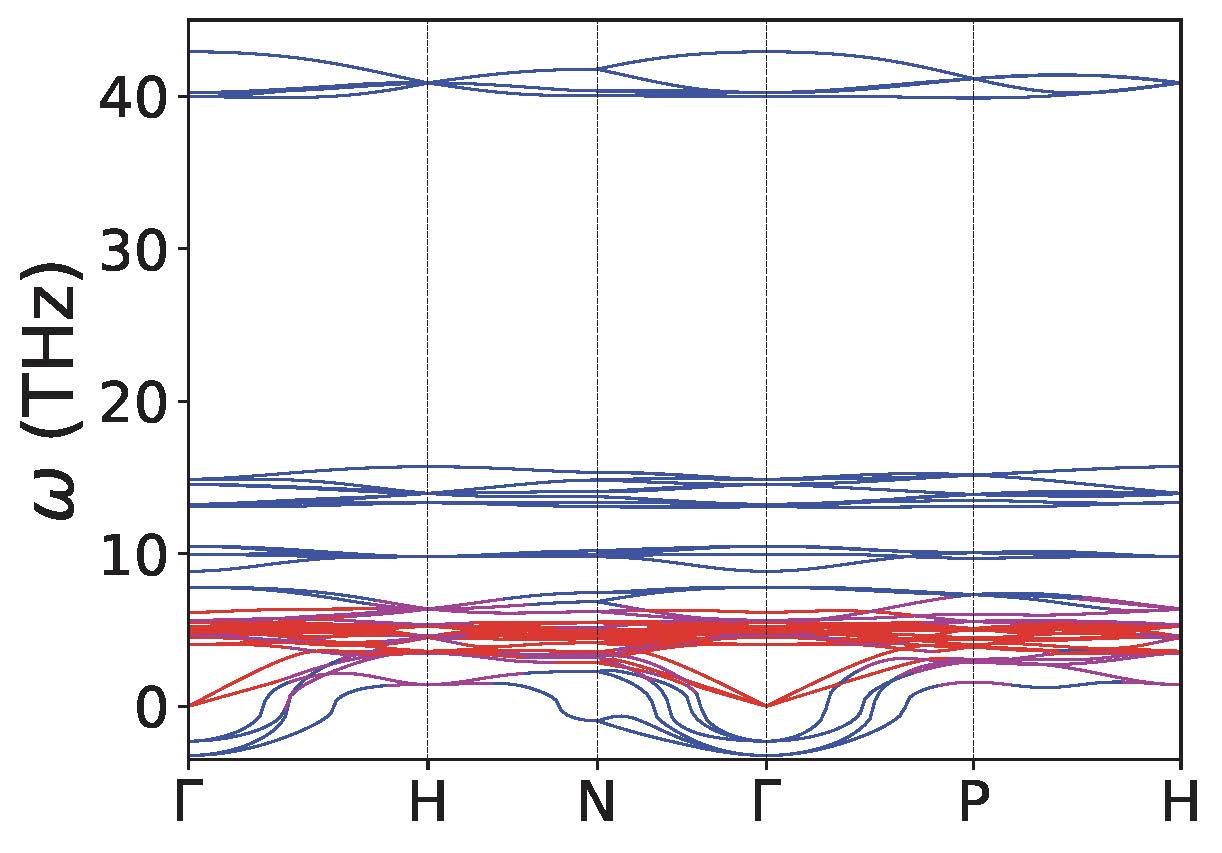
Atom-projected phonon dispersion
Make sure .eig file is present inside R{id}-{name}/calc folder
Use
phonprojkeyword in input.in file in the plot section, and performmainprogram 19. This step creates following files inside R{id}-{name}/calc/ folder.phonon-name.proj.gp ==> Has atomic projection for one atoms followed by others. name would be ‘MgB2’
phonon-Mg.proj ==> separate file for Mg projections
phonon-B.proj ==> separate file for B projection
Check
plot-proj-{id}-{name}.pdfinsides plots directory. Here is an example of Y2C3: Y (red) and C (blue).
Band structure and DOS calculation
Perform structure relaxation.
For QE, after structure relaxation, execute:
mainprogram 4
# Bandstructure (QE).  R{id}-{name}/bands folder created.
mainprogram 13      # bandscf-scan: stage the calculation
mainprogram 14      # band-scan:    non-scf band structure
mainprogram 15      # bandp-scan:   post-process with bands.x

# Density of states (QE).  R{id}-{name}/dos folder created.
mainprogram 16      # dos-scan:     nscf for the DOS
mainprogram 17      # dosp-scan:    total DOS with dos.x

# Partial density of states (QE)
mainprogram 18      # pdos-scan:    partial DOS with projwfc.x

# Bandstructure (VASP)
mainprogram 13
mainprogram 15

# Density of states and partial DOS (VASP).  VASP writes both from the
# same run, so process 16 covers the total and the projected DOS.
mainprogram 16

# Plotting (QE and VASP)
mainprogram 19
Process 19 also writes band_stat.csv inside R{id}-{name}/bands/, which
stores the minimum and maximum eigenvalue of each band – useful for locating the
energy windows for the wannierisation process.
Each process is a separate invocation; mainprogram accepts one process at a
time. There is no range syntax: a range such as 13-15 is not a command and
is rejected with exit status 2.
Partial DOS is process 18. Do not use 20, which is clean-scan and
deletes the wavefunctions.
Worked example: examples/QE/tutorial12 and examples/VASP/tutorial11.
Applying distortion following eigenmode
This functionality is only available for Quantum ESPRESSO (QE).
Ensure that the {name}.dyn file exists inside the R{id}-{name}/calc/ folder, where {id} and {name} correspond to identifiers and names found in the mpid-list.in file.
# Execute dynmat.x and create dynmat.axsf file with eigenmodes.

mainprogram 23

# Obtain atomic displacement files for a phonon mode. Relax distorted structures. Perform relaxation of 3N modes for systems with N ions. It creates ``R{i}`` folders, ``i = 1 to N`` inside R{id}-{name}/

mainprogram 24

#Collect results "Energy-mode.csv" from the relaxation of distorted structures, can be found in R{id}-{name}/

mainprogram 25
To obtain unique relaxed energies, follow these steps:
Copy
extract_single_distortanddistort_extract.pyfrom theutility/distortionfolder.Execute
./extract_single_distort start end mpid-list.inin your terminal. Replacestartandendwith appropriate indices, andmpid-list.inwith the relevant file containing compound information.This process extracts unique ground-state energies for any compound and stores the results in the
distorted-energy.csvfile.
Pressure calculation
Perform structure relaxation.
Use the pressure.in file with the following format:
all

v1 50

v2 100

v3 150
The first line represents the
cell_dofreeparameter.allindicates that all angles and axes are moved.The subsequent lines, e.g.,
v1 50, denote the indices (v1, v2, etc.) and the corresponding pressure values in kbar.
For Quantum ESPRESSO (QE):
Execute
mainprogram pressure-inputto create separate files for pressure insidescf_dir/scf-mpid-pv.in, wherepvsignifies the pressure value substituted. Additionally,mpid-pressure.inis created.
For VASP:
Utilize the “pressure.in” file with the format:
v1 0.92

v2 0.94

to isotropically scale the lattice parameters.
For phonon calculations with pressure:
Use the
ph-q.infile for the Gamma point calculation. Other generic q-points can also be used.0 0 0 T
Here,
Tdenotes a metal; otherwise, it is considered nonmetallic.Execute
mainprogram epw1to generate input files for phonon calculations.
Perform the following operations:
mainprogram 26      # pressure-relax-scan: scf for every pressure or volume
mainprogram 27      # pressure-ph-scan:    phonons for every pressure
Additionally, you can incorporate mpid-pressure.in in input.in and conduct other calculations.
Execute mainprogram 28 to clean pressure folders.
Worked example: examples/QE/tutorial13 and examples/VASP/tutorial12.
Substitution calculations
Site substitution is implemented in htesp/site_subs.py and driven by the
substitute section of config.json; there is no
separate command-line helper.
In the config.json file, ensure the existence of the substitute keyword. To execute the substitution, run:
mainprogram 29
There are two modes of substitution:
Mode 1 – element replacement
Replace an element in a parent compound with a dictionary of elements and the number of sites as key-value pairs.
For example, for the compound MgB2 requiring substitution for B, the substitution key will be as follows:
"mode": 1

"elm": 'B'

"sub": {'B': 1, 'C': 1}, {'B': 0, 'C': 2}
This action will generate two additional files named MgBC and MgC2. The mpid and the compound name will be added to the mpid.in file. Additionally, two input files will be created inside the scf_dir directory as scf-mpid-1.in and scf-mpid-2.in.
For VASP, Rmp-763-1-MgB2 and Rmp-763-2-MgB2 folders will be created with INCAR, KPOINTS, and POSCAR files. Create POTCAR separately. Once again, the mpid and the compound name will be added to the mpid.in file. Now, use the name of the mpid.in file in the input.in file to perform other calculations.
To use the functionality, ensure the presence of the bsym package.
Worked example: examples/QE/tutorial14 and examples/VASP/tutorial13.
Mode 2 – dictionary replacement
Utilize a dictionary in which all keys are replaced by their corresponding value pairs.
"mode": 2

"new_sub": {'B': 'C'}
Fermi Surface
Perform structure relaxation.
First, generate a job script run-ifermi.sh. If not present, then run-vasp.sh script will be used with default commands (see the ifermi-scan shim in bin/). We can utilize ifermi.json file for customized run-ifermi.sh script. Once, we edit based on our need,
execute:
mainprogram jobscript
For Fermi surface calculations using IFERMI:
Install the IFermi package: IFermi installation, or
pip install "htesp[fermisurface]".Once the
vasprun.xmlfile is created insideR{id}-{name}/relax/, execute
mainprogram fermisurface
to generate Fermi surfaces in different formats using the IFermi package. Check for required dependencies for
various plotting option. For example, you may need the kaleido package
(pip install -U kaleido) to export figures from plotly.
Worked example: examples/VASP/tutorial21. It ships only the reference
archive, so copy a relaxed vasprun.xml from examples/VASP/tutorial9 into
R{id}-{name}/relax/ before running it.
Thermodynamic stability (Convex Hull)
Prepare input files
Suppose we are computing phase diagram of MgB2, then we need to download all the elemental solids, binary solids corresponding to composition Mg-B. We do that by switching on the chemsys mode in download keyword in config.json.
"download": {
"mode": "element", ==> change this to "chemsys"
  ......}
Now edit following portion of the config.json file:
"chemsys": {
  "entries": ["Mg", "B"],
  "size_constraint": 60, ==> Optimal size of the compounds.
  "ntype_constraint": 3,  ==> Compounds containing fewer than 3 different species, specifically 2.
  "must_include": ["Mg", "B"], ==> If "B" is not included, only compounds containing "Mg" and the binary compound "Mg-B" are extracted since "Mg" must be included.
  "FE": false,
  "thermo_stable": 0.02,
  "metal": false,
  "magnetic": true,
  "spacegroup": null},
By switching all other keyword to false, we don’t apply any filter on these properties. Now, we will search these
queries on Materials Project database by executing:
mainprogram search
Now, we will adjust start, end, and mpid-list.in in input.in. We now execute download command to generate input files. If you want to use VASP, then set DFT = VASP.
mainprogram download
Now, the folders appeared in R{id}-{name} format, with id and name recorded in mpid.in file. Now change mpid-list.in to mpid.in in input.in file and perform structure relaxation by executing:
Perform structure relaxation.
Repeat the processes process = 2 and 3 several times to ensure full relaxation. If the relaxation completes in 1 ionic step, using mainprogram 2 will change the NSW keyword inside INCAR to 0. Finally, execute mainprogram 3 for VASP to obtain accurate total energies. In QE, the code always performs one more electronic self-consistent field (SCF) after the convergence of each ionic relaxation, therefore, there is no need to worry about it.
Execute:
mainprogram e0
to collect the total energy per atom. It writes econv.csv, for both QE and
VASP. Finally, execute:
mainprogram pd
to compute phase diagram. Data are stored in convexhull.csv and convexhull.pdf plot is created. The display of unstable mode is regulated by the “chull_cutoff” key.
Worked example: examples/QE/tutorial16 and examples/VASP/tutorial15.
Magnetic enumeration
Perform structure relaxation.
There are 2 types of magnetic enumeration process with VASP, ordering and magnetic anisotropy. This requires update in “magmom”:
ordering:
"magmom": {
    "magmom": {
      "Mn": 5,
      "Cr": 5,
      "Fe": 5,
      "B":0},
    "type":"ordering",
    "saxis":[[0,0,1],[1,0,0],[1,1,0],[1,1,1]],
    "order": ["ferromagnetic", "antiferromagnetic", "ferrimagnetic_by_motif"]}
Magnetic Anisotropy:
"magmom": {
    "magmom": {
      "Mn": 5,
      "Cr": 5,
      "Fe": 5,
      "B":0},
    "type":"anisotropy",
    "saxis":[[0,0,1],[1,0,0],[1,1,0],[1,1,1]],
    "order": ["ferromagnetic", "antiferromagnetic", "ferrimagnetic_by_motif"]}
To obtain input files for magnetic anisotropy calculations (MAEs), we can achieve in two step. First, add LSORBIT .TRUE. key in vasp.in file (before lines with single column), and update the INCAR by executing:
mainprogram download
This will write MAGMOM in mx my mz format. Now execute:
mainprogram magenum
This creates input files with mpid-magnetic.in file. Update mpid-magnetic.in in input.in execute relaxation command:
mainprogram 1
Similarly repeat process 2 and 3 for complete relaxation.
Worked example: examples/QE/tutorial21 and examples/VASP/tutorial20.
Magnetic force theorem
The magnetic anisotropy energy is the difference in total energy between two magnetisation directions. Those differences are of the order of \(\mu\)eV per atom, so subtracting two independently converged self-consistent runs is rarely accurate enough. The force theorem takes the difference from a single converged charge density instead: converge the collinear, spin-orbit-free ground state once, then run each magnetisation direction non-self-consistently on that fixed density and compare band energies.
HTESP automates the direction part for VASP. Set the anisotropy mode in the
magmom dictionary of config.json:
{
  "magmom": {
    "magmom": {"Mn": 5, "B": 0},
    "type": "anisotropy",
    "saxis": [[0, 0, 1], [1, 0, 0], [1, 1, 0], [1, 1, 1]],
    "order": []
  }
}
Then:
Perform structure relaxation and let the collinear run converge. Add
LCHARG .TRUE.to vasp.in so that theCHGCARsurvives, and update theINCARwithmainprogram download.Add
LSORBIT .TRUE.to vasp.in (before the lines that hold a key with no value) and, for the force-theorem step,ICHARG 11so that each direction reads the converged density instead of recomputing it. Update theINCARagain withmainprogram download. WithLSORBITset,MAGMOMis rewritten inmx my mzform.Generate one directory per magnetisation direction:
mainprogram magenumThis creates
R{id}-saxis-{xyz}-{name}/relaxfor every entry ofsaxis, copies theINCAR,POSCAR,POTCAR,KPOINTSand, when it exists, theCHGCARof the converged run, rewritesSAXISin each, and lists them inmpid-magnetic.in.Put
mpid-magnetic.inin input.in and submit the directions:mainprogram 1
Collect the energies:
mainprogram e0The anisotropy energies are the differences between the rows of
econv.csv, one row per direction.
Without ICHARG 11 each direction is converged self-consistently, which is a
valid but more expensive and noisier route to the same number.
For Quantum ESPRESSO this is not implemented: mainprogram magenum with
"type": "anisotropy" prints To be implemented and writes nothing. Build
the nscf runs by hand (lforcet = .true., nosym = .true.,
startingpot = 'file', noncolin = .true., lspinorb = .true.) from the
inputs process 4 produced.
Computing elastic constants
Perform structure relaxation.
To execute strain calculations, modify the strain keyword in the config.json file. Then, using the input.in and mpid.in files, execute the following commands:
mainprogram elastic-input
This command applies strain to the conventional unit cell, generates deformed structures, and submits calculations.
Once the calculations are completed, execute the following command:
mainprogram compute-elastic
This command computes the elastic constants and stores the results in the elastic.csv file. Make sure, your results are converged with respect to plane-wave energy cutoff and k-point mesh.
Worked example: examples/QE/tutorial15 and examples/VASP/tutorial14.
Printing compound information
Now, basic information about systems under calculations can be printed by executing:
mainprogram compound
It prints data as follows:
Printing info about compounds. Do 'mainprogram compound > compound.txt' to save in 'compound.txt' file

*               Compound: Mg1B2

Looking for scf-mp-763.in file. Structural parameters before relaxation

************ Printing structural parameters *****************

         Cell par: (3.0627622617599624, 3.0627622617599624, 3.52087, 90.0, 90.0, 120.00000000000001)

         Cell volume: 28.6027 $\AA^3$

         Spacegroup: ('P6/mmm', 191)


Looking for scf-relax-mp-763-Mg1B2.in file. Structural parameters after relaxation

************ Printing structural parameters *****************

         Cell par: (3.0691304614624833, 3.0691304614624833, 3.515658311, 90.0, 90.0, 119.99999998841307)

         Cell volume: 28.6793 $\AA^3$

         Spacegroup: ('P6/mmm', 191)

         Valence Electrons: 16.00

         Fermi Energy: 9.1373 eV

         KEcutoff: 35, Ry

         K-mesh info: (automatic)  16 16 16 0 0 0

         q-mesh info: [nq1=4,nq2=4,nq3=3]

******************************************************

all done
Wannier interpolated bandstructure
Perform structure relaxation.
Additionally, compute DFT band structures and atom and orbital projected
density of states (DOS). The DOS tells you which orbitals sit
at the Fermi level and therefore what to project onto; band_stat.csv, written
by process 19 into R{id}-{name}/bands/, gives the minimum and maximum
eigenvalue of every band and therefore the disentanglement and frozen windows.
The complete worked instance is examples/QE/tutorial19 (MgB2). The steps
are:
Build every downstream QE input from the relaxed structure:
mainprogram 4
Write the scf and nscf inputs the wannierisation needs:
mainprogram epw1Copy
wannier90.jsonfromutility/input_filesinto the working directory and set the windows and the plotting flags in it – see wannier90.json.dis_win_min/dis_win_maxbound the states entering the disentanglement,dis_froz_min/dis_froz_maxthe states reproduced exactly. Read all four offband_stat.csvand the projected DOS.Set
"which_calc": "wannier"in the job_script dictionary with the command list["scf", "nscf", "wannier_prepare", "pw2wannier90", "wannier_band"], and generaterun-wannier_band.sh:mainprogram jobscriptWrite the projections. Put them in a projection.in file in the working directory – one species per line, for example
Mg:sandB:pz;px;py– and run:mainprogram wann-filemainprogram wann-randomuses random projections when you have noprojection.in, andmainprogram wann-scdmderives them from an SCDM fit (this needslmfit, and the extra stepsmainprogram epw3andmainprogram epw4beforehand).Check
pw2wan.inandex.wininsideR{id}-{name}/epw/and adjust them if you need Wannier90 settings the JSON file does not cover. Submitrun-wannier_band.sh.Plot the interpolated bands by putting
wann_bandin the plot line of input.in and running:mainprogram 19
To compare the interpolated bands against QE on exactly the same k-points, run
mainprogram epw5first: it prepares a QE band calculation on the k-points of the Wannier calculation.
The interpolated Hamiltonian ex_hr.dat written here is also the input to the
WannierTools calculations (mainprogram wt1 and mainprogram wt2; see
mainprogram wt-info) and to the EPW calculations
(mainprogram epw-file, epw-random, epw-scdm; see
mainprogram epw-info).
Phonon calculations
DFPT:
Perform structure relaxation.
Prepare, QE input files for scf calculations to obtain the charge density by executing:
mainprogram 4
One can extract phonons from electron-phonon coupling (EPC) calculations.
Similarly, one can perform phonon calculations by executing:
mainprogram epw1

mainprogram qe-ph
Post-processing processes to obtain phonon dispersion plots are:
mainprogram 8

mainprogram 9

mainprogram 12

mainprogram 19
Please, refer to the command reference for a description of these commands.
Supercell method:
For this method, we utilize Phonopy with either Quantum ESPRESSO (QE) or VASP. Please install Phonopy and ensure that the phonopy command is accessible.
#Prepare input files, create supercells, generate structures with displaced ions, and submit SCF calculations for each displacement.
mainprogram phono1

#Compute force constants
mainprogram phono2

#Generate band.conf file and plot phonon dispersion.
mainprogram phono4
Worked example: examples/QE/tutorial17 and examples/VASP/tutorial16.
Equation of states
To collect energy-volume data for different pressures and perform relaxation, use the ev-collect command. This command generates an e-v.dat file in each directory corresponding to a specific pressure. Follow the steps below:
First, create input files for different pressures and perform relaxation (repeat this).
After relaxation, execute the main program
ev-collectto extract energy-volume data. This program automatically generates ane-v.datfile in each directory corresponding to a specific pressure.
mainprogram ev-collect
The eos-bm command is used to obtain the equation of state (EOS) using the Birch-Murnaghan EOS. To use this command, follow these steps:
Generate Energy-Volume Data: Before using eos-bm, ensure you have collected energy-volume data using the ev-collect command.
Execute the main program eos-bm to analyze the energy-volume data and obtain the equation of state using the Birch-Murnaghan EOS.
mainprogram eos-bm
To plot various volume-energy, pressure-volume, and pressure-enthalpy curves, follow these steps:
Copy the plotting script: copy
utility/usefull_scripts/birch_murnaghan_enthalpy.pyinto the working directory.Execute the Script: Execute the copied script using the command
python birch_murnaghan_enthalpy.py. Use the “help” option to get started and understand the plotting options available.Rename
e-v.datfiles: Ensure that eache-v.datfile from different directories is renamed to follow the formate-v-1.dat,e-v-2.dat, and so on. This ensures that the script can process multiple energy-volume datasets.
Worked example: examples/QE/tutorial18 and examples/VASP/tutorial17.
Charged calculations
First prepare charge.in.
Execute:
mainprogram charge-input
To create input files with different net charges:
For QE:
- Input files named scf-{mpid}-{icharge}.in are created within the scf_dir folder, where {icharge} takes values from 1 onwards.
For VASP:
- Folders named R{mpid}-{icharge} are created, each containing the necessary input files for a specific net charge.
In both cases, a file named mpid-charge.in is generated to list the material ID and compound name of these input files.
Worked example: examples/QE/tutorial20 and examples/VASP/tutorial19.
Checking running calculations
check_calc <your_queue_command> <your_account_id>

#Here, queue command could be ``squeue``.
Printing history of mainprogram
To view the ten most recent occurrences of the “mainprogram” command within the current session, execute the following two commands.
history -a

mainprogram history
Aborting jobs with job_id
cancel_job <job_id_start> <number_of_jobs> <Your_job_cancellation_command>